
The problem
We were using a commercial family display that worked fine as a calendar, but it stopped there. Products like Skylight Calendar sell a touchscreen with color-coded events and chore charts, and Mango Display turns a TV you already own into a dashboard of widgets. Ours could show events, but it could not help us manage the real parts of family life, like:
- Who is cooking tonight
- Which chores belong to which kid
- Whose game or recital is today
- What should be on the board as a reminder or countdown
That meant the screen was informative, but not interactive. The kids could see it, but they did not need to engage with it. I wanted a board that would make participation easier than ignoring it.
Why I built instead of bought
This was a build-vs-buy decision, and I decided it the way I would at work. Buy makes sense when the tool covers the general job. Build makes sense when the thing that makes it useful is specific to your own rules.
That is what happened here. Off-the-shelf products covered the basic calendar part. They did not cover our house logic. The dinner vote closes at 6 PM. The chore spinner will not give the same chore twice. Countdown items are balanced so one child does not take over the board. So I kept the useful parts of the category and built the part no one else could know: our family rules, as software.
Constraints
Privacy was a core requirement. The board shows my children's names and schedules, so it fails closed: when something is wrong, it locks instead of opening up. The board uses a secret key in the URL, and if that key is missing or wrong, the page returns "not found." In production, if the key is not configured at all, the board refuses to render. A setup mistake cannot accidentally expose the family calendar.
The calendar connection is read-only. The app reads our Google Calendar through a service account, a robot account with its own credentials that I gave permission to read events and nothing else. It cannot edit or delete them. So even if something goes wrong in the code, it cannot damage the family calendar.
The TV is treated like an appliance, not a laptop. If the network drops or the browser gets stuck, the board has to recover on its own. The TV checks a health endpoint every 15 seconds, and if it hears nothing for 90 seconds, it reloads itself once. And if the live data store is unreachable, the board still renders; the vote card simply says voting will turn on once storage is connected. No stack traces, no frozen screen.
My approach
I kept the design focused on three things:
- The TV should answer one question fast: what is happening soon?
- Each child should be able to find their own events in a couple of seconds.
- The board should let kids do something, not just read something.
That meant I kept the TV view short and readable. It shows the next couple of days, not the whole month. It also uses colors and icons so each child can spot their own items quickly.
How it works
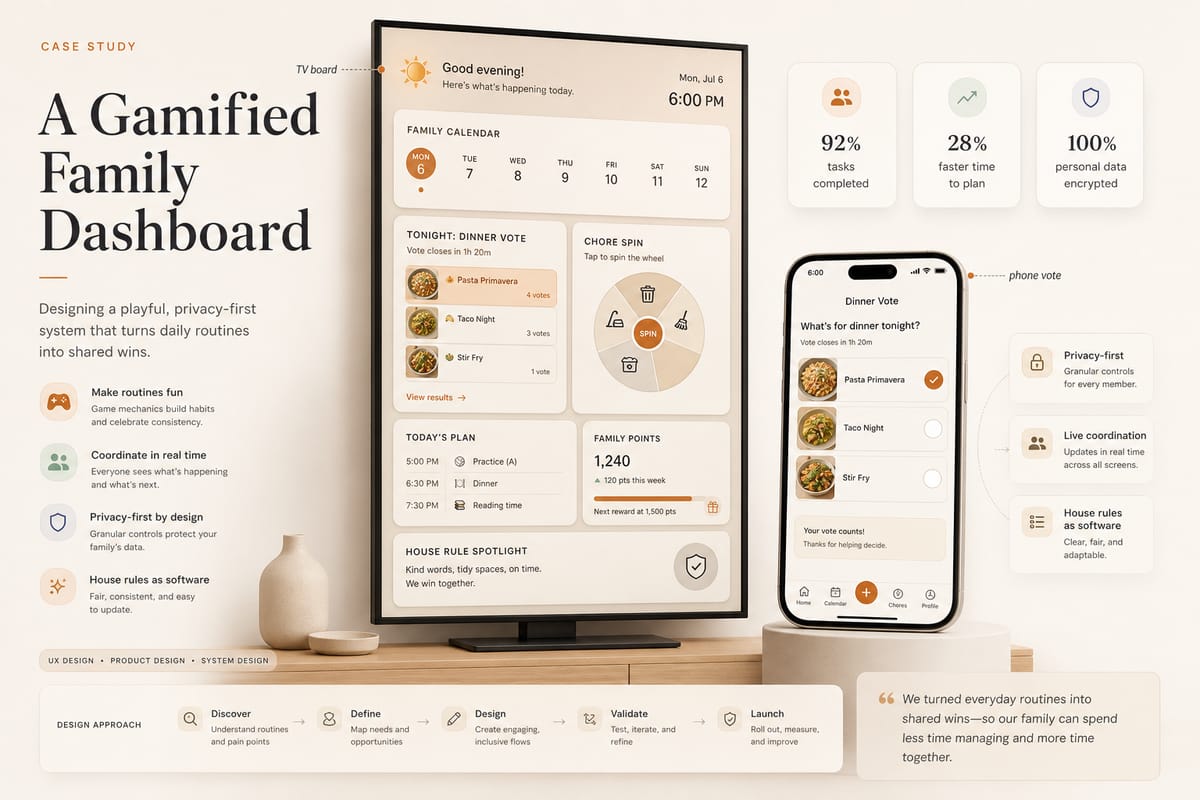
The dashboard has two main surfaces, the same two you can see in the concept art at the top of this page:
- A vertical TV board in the living room
- Simple phone pages for voting and spinning chores
The TV shows the big picture. The phone pages let the kids participate, one QR scan away. The system uses the family Google Calendar as the main source of truth for events, and a small shared data store (Redis) for live actions like dinner votes and chore claims. The pages themselves are built by a Next.js app hosted on Vercel. When a child votes on dinner or spins for a chore on their phone, the TV updates shortly after, so everyone sees the result without anyone refreshing anything.
Dinner voting
Dinner is a live vote.
The TV shows the choices and a QR code. Each kid votes from their phone. Votes can change until 6 PM, when the poll locks. Eat-out options can only win three times per rolling five weekdays. If there is a tie or no one votes, the system falls back to "Cook at Home."
The vote rules are built into the software, not left to memory or parental follow-up. That makes the rule consistent, even when everyone is tired.
Chore spinning
Chores work the same way.
Each child scans the QR code, picks their name, and spins for a chore on their phone. The system makes sure:
- One child cannot spin more than once per day
- The same chore is not assigned twice
- The server, not trust, decides the final result
That last part matters. If two kids spin at the same instant, the system still keeps the result fair. The claim runs as one atomic action, a small Lua program inside the database that records who got which chore and marks it taken in a single uninterruptible step. Both children cannot win the same chore, and the wheel animation on the phone always lands on the server's answer.
The calendar is the control panel
I did not build a separate admin panel. The family calendar is the admin panel. Special event titles control what appears on the board:
Dinner: tacossets tonight's dinnerNote: grandma lands Fridayadds a bannerCountdown: science faircreates a countdownStar: Avagives one child a special marker for the day
This keeps the system simple for the parent. She can manage it with the calendar she already uses, instead of learning a new app. It also means she can run the board by chatting with Claude on her phone: the assistant edits the calendar, the board reads the calendar, and the title grammar is the contract between them.
What I used
The implementation is intentionally small.
- Next.js for the web app (App Router, server rendering)
- Vercel for hosting, on the free tier
- Upstash Redis for shared live state: votes, chore claims, points
- Google Calendar API for family events, read-only by design
- Lua scripting in Redis for atomic chore claims
- Open-Meteo for weather, no API key and no account
- Fully Kiosk Browser to keep the TV app running full screen
I kept the dependency surface small on purpose: four runtime packages, with the Redis client and the Google login hand-written on Node's built-ins. For a family-facing system, fewer moving parts means fewer ways for the experience to break, and less third-party code near my children's schedules. Eight test suites cover the parts that judge between children: the poll, the spin, the fairness balancer, and event attribution.
Want to build one? Start here
People ask how to do this for their own family. Here is the whole path, in order. You do not need to be a professional developer; AI coding tools close most of the gap, and the hard parts are decisions, not code.
- Step 1. Pick the screen. Use any TV that can run a browser. Install a kiosk browser app (like Fully Kiosk) so the page stays full screen, always on, and starts on boot.
- Step 2. Set up the calendar. Create a dedicated family Google Calendar. Make a service account with read-only access and share the calendar with it, so the app can read events but never change them.
- Step 3. Build the board page. Build a small web app (Next.js or any framework) that reads the calendar and renders one page: the next two to three days, color-coded per family member.
- Step 4. Host it free and lock it down. Deploy to a free hosting plan such as Vercel. Protect the page with a secret key in the URL that fails closed: no key, no page.
- Step 5. Add participation from phones. Add phone pages behind a QR code on the TV, and a free Redis database (such as Upstash) for live state like dinner votes and chore claims.
- Step 6. Encode one house rule at a time. Start with a single rule, like a dinner vote that locks at 6 PM. Let the kids try to break it, fix what they find, then add the next rule.
Results
The dashboard is live and being used in the home. The practical outcomes are the things that matter most:
- Dinner decisions happen on the ballot instead of in the kitchen
- Chores are assigned without back-and-forth
- Kids can see their own schedules quickly
- The board updates without constant manual refreshing
- The system stays usable even when parts of it have problems
I am deliberately not inventing adoption percentages for my own household. The metrics above are the ones I can verify in the codebase, and the bigger win is structural: the board now supports the household instead of just displaying information.
About these numbers
The figures on this page are drawn from internal program reporting I authored or co-authored as the practitioner on the engagement. They are reproduced here in rounded form. They were not produced by an independent third party, and proprietary detail has been omitted where required by the engagement.
Lift figures (CSAT, accuracy, handle time, hallucination rate) reflect pre/post comparisons against a matched baseline using the cohort, time window, and measurement instrument noted in the case study. Volume and adoption figures come from production analytics dashboards. Cost figures reflect either avoided spend or unlocked budget in the named fiscal period.
- This is a personal, private build for my own family. Names, schedules, and identifying details are deliberately left out, and the repository stays private, so this case study shows the design and the mechanisms rather than screenshots of my children's calendar.
- All counts (dependencies, test suites, surfaces, watchdog timings) come from the codebase itself, not from analytics.
- The under-2-seconds figure is the design target the color and avatar system was built against, verified informally at living-room distance, not a measured study.
- Zero family data to third parties: calendar data is fetched server-side with a read-only service account, weather is fetched by coordinates only, and QR codes render locally as SVG. No analytics or tracking scripts run on the board.
Questions people ask about this dashboard
How does the privacy gate on the family dashboard work?
The board sits behind a secret key in the URL and fails closed: if the key is missing or wrong, the page returns not found, and in production, if no key is configured at all, the board refuses to render. A setup mistake cannot accidentally expose the family calendar.
How does the chore wheel stay fair when two kids spin at the same time?
Each chore claim runs as one atomic action, a small Lua program inside the database that records the assignment and marks it taken in a single uninterruptible step, so the same chore can never be assigned twice even if two people spin at the same instant.
What happens if the live data store goes down?
The board still renders. The dinner-vote card simply reports that voting will turn on once storage is connected, instead of showing a stack trace or a frozen screen, and the TV self-heals by reloading itself once if it hears nothing from its health check for 90 seconds.
Can I build a family dashboard like this for my own family?
Yes. The case study includes a six-step starter guide, from picking a kiosk-mode screen to encoding one house rule at a time. You do not need to be a professional developer; AI coding tools close most of the gap.
Why this project matters
This project is not just a calendar board. It is a small example of how software can support real behavior in a real household. It combines product thinking, interface design, privacy, reliability, and light automation in a way that is practical, not flashy. Most importantly, it turns a passive screen into something the family actually uses.
Skills demonstrated
- Product strategy (build vs buy)
- Gamification and incentive design
- Behavioral design for real users
- Privacy by design
- Conversation design (calendar-title grammar)
- Full-stack build (Next.js, Redis, Lua)
- Concurrency and race-condition design
- Graceful degradation and self-healing
- Responsive design (TV to phone)
- Test design for adjudicating logic
- Scope discipline and rollback planning